Splashed water falls back on Fast
On Fast, water thrown out of the top of the simulated region now flies on under gravity and falls back, instead of vanishing; Water into a cup at Custom 2 mm keeps all of its water.
The splash falls back
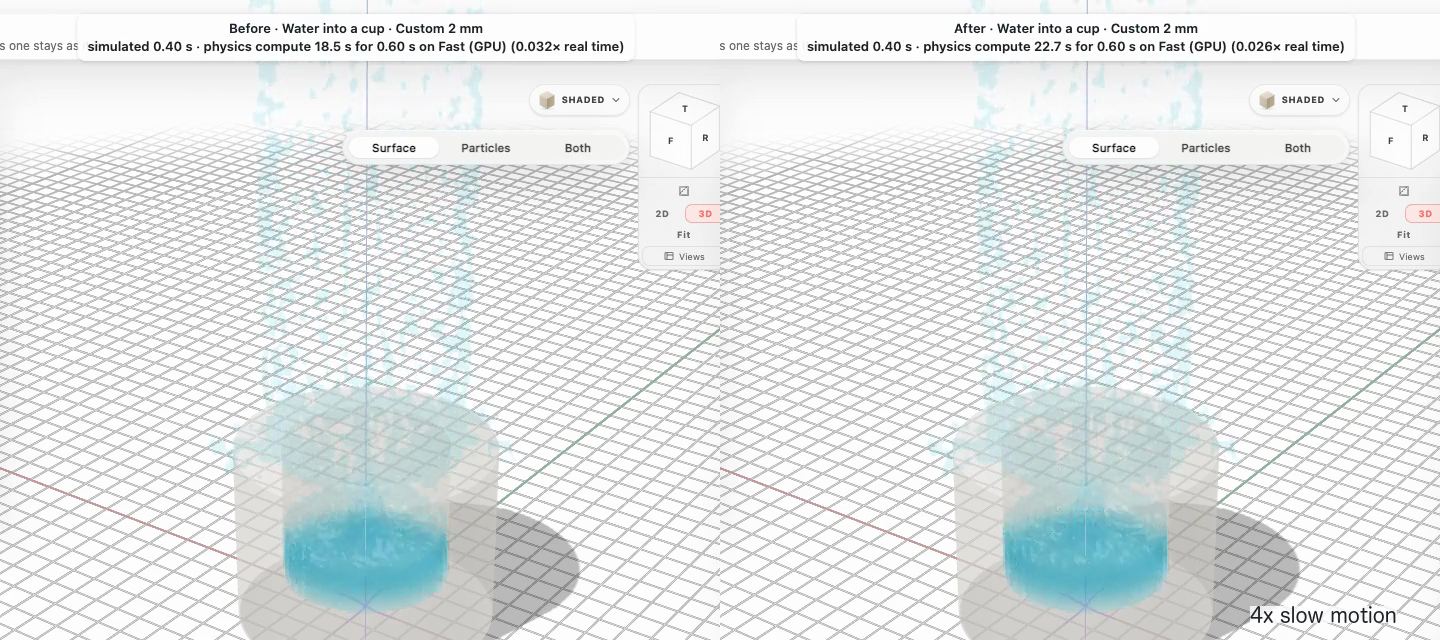
What happens at the edge of the simulated region
The simulated region is sized from your scene with room around it. On Fast, a drop thrown out of it keeps going: it rises, falls back under gravity and joins the simulation again where it comes back in, at the point and time its flight says. A drop that comes down beside the region lands on the ground there and stays in the scene.
Outside the region, particles move on their own: they do not touch each other or anything but the ground. Water that runs out over the ground as a thin layer keeps sliding, because Fast's water has no surface tension or friction against the ground yet.
- Open Demo files, then Water into a cup under Simulation. The first time in a session, press I understand, open Simulation.
- Under Size, choose Custom and set Grid to 2 mm. Keep Engine on Fast and press Go.
- Watch the spray climb above the cup and rain back down around it. Open Details: Outside the region shows the drops still in flight, and the particle count stays the same.
Everything in this release
Fixed
- On Fast, splashed water falls back instead of vanishing at the top of the simulation. Material thrown out of the simulated region flies on under gravity and falls back into it, or lands on the ground outside it. Before, Fast removed it at the region's edge: in Water into a cup at Custom 2 mm about 7 % of the water disappeared in the splash.
- The particle count no longer drops when a splash leaves the region, and the water's mass stays the same throughout the run.
- Details › Outside the region shows how many particles are out of the region right now and their mass. They count in every total. Left the scene now counts only material that can never come back, because it fell where there is no ground.
- The Scene panel's Ground note, Details › Simulated region and the ⓘ next to the Engine switch say what Fast does with material thrown out of the region. Accurate still removes it at the region's edge and counts it under Left the scene.
- Keeping that water costs compute: Water into a cup at Custom 2 mm now takes about 28 s of compute per simulated second on a Mac Studio M5 Max, up from about 23 s. Scenes where nothing leaves the region run at the same speed as before.
