Fix and Load on Fast
Steel and aluminium parts with a fixed face and a load now run on Fast, the default engine. The Cantilever demo is settled within a second of pressing Go, where Accurate takes about 40 seconds, and lands within a few per cent of beam theory.
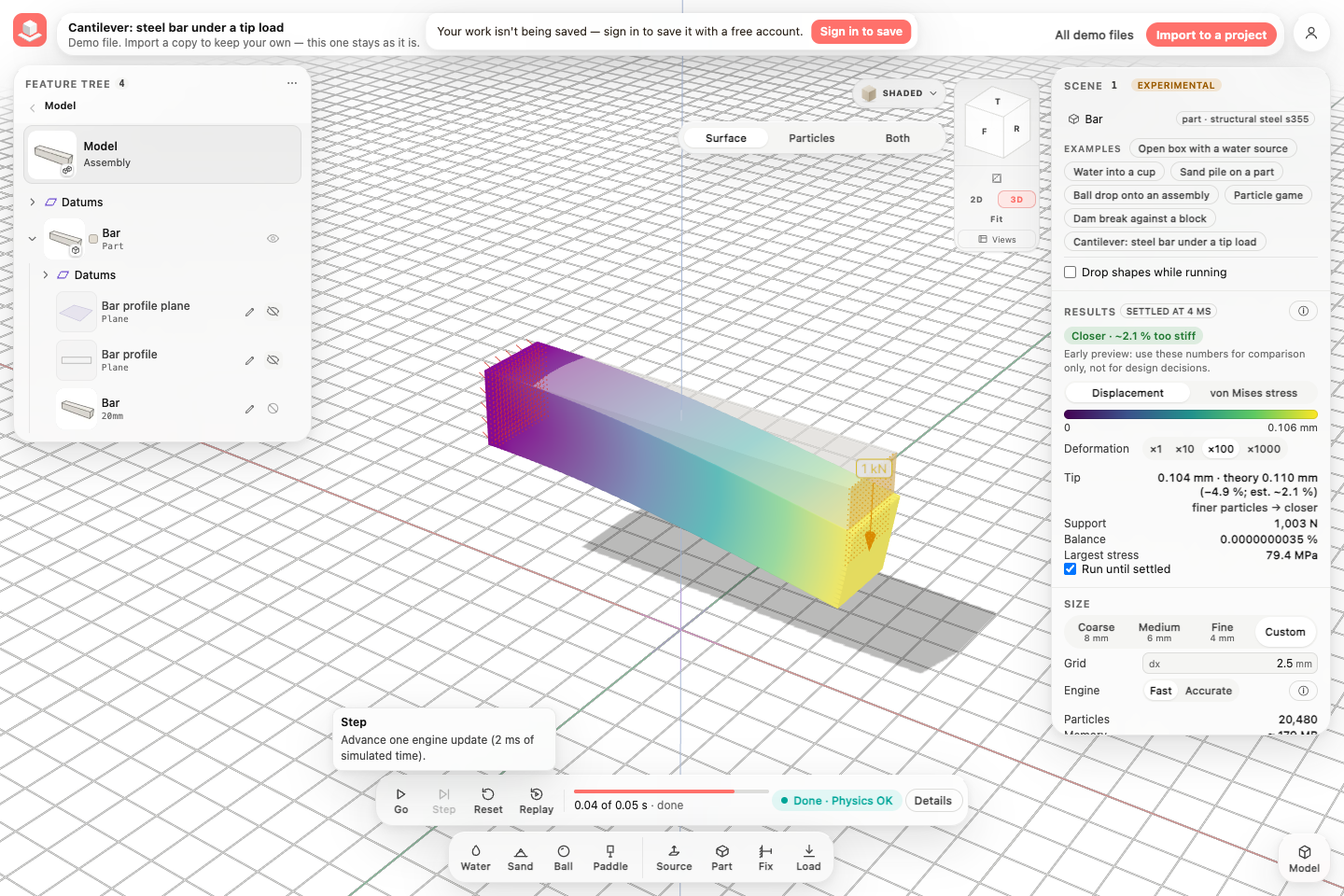
The Cantilever demo, settled on Fast
The steel bar fixed at its left end, 1 kN down on its right end, settled on Fast and coloured by how far it moved, its bend drawn 100 times larger; Results read Settled at 4 ms, the tip next to beam theory and Fast's accuracy chip.
What runs on Fast
A part held by a fixed face and pushed by a load runs on Fast when it is stiff at the frame rate: its slowest vibration is faster than a 1 ms frame can show. Steel and aluminium parts of the sizes you model qualify. Fast then gives the part its settled shape for the loads at every frame, computed with the material's real stiffness, so the run is at rest as soon as the loads are fully applied.
Water and sand meet a fixed metal part on Fast as they meet any fixed part: they flow around it and never pass through it.
- Open Demo files, then Cantilever: steel bar under a tip load under Simulation. The first time in a session, press I understand, open Simulation.
- Under Engine, keep Fast.
- Press Go. Results reads Settled within a second, with the tip's displacement next to the beam-theory answer.
What Fast leaves out
Fast does not show a metal part's vibration. A load applied at once would set a steel bar ringing hundreds of times a second; Fast shows the shape it rings around, and Results counts the energy of that vibration as taken out. A load ramped over a few milliseconds sets almost none.
The part stays elastic on Fast. If its stress goes above the material's yield, the result is still the elastic one; Accurate models the yielding.
Water pushing on a fixed metal part does not bend it on Fast yet. A load on a part without a fixed face, and fixed faces on sand or other loose materials, still run on Accurate.
Everything in this release
Improved
- A part with a fixed face and a load runs on Fast when its material is stiff enough that its slowest vibration is quicker than a 1 ms frame can show: steel, aluminium and the other metals at the sizes Simulate uses. It used to run on Accurate only.
- On Fast the part takes its settled shape for the loads at every frame, with the material's real stiffness, so it is settled as soon as the loads are fully on. The Cantilever demo is settled well within a second of pressing Go (Accurate: about 40 seconds); preparing the part takes about a second while the scene builds.
- Fast's answers come closer to beam theory at the same size: a 10 mm steel bar reads about 3 % from theory at 4 cells through it and about 2 % at 8 (Accurate: about 17 % and 6 % too far). Fast's part reads slightly too stiff, partly because its support holds the end face fully, as a real clamp does.
- Results says which engine computed it: on Fast the accuracy chip reads Fast's own estimate (for example Closer · ~2.2 % too stiff), and ⓘ explains how Fast computes the shape and what it leaves out.
- If a loaded part's stress goes above its material's yield on Fast, or it turns by more than about 6° under its loads, Results says so: Fast keeps the part elastic and its turns small, and Accurate models the yielding and large bends.
- A load on a part without a fixed face, a fixed face on sand or another loose material, and a part that is flexible for its size (a long thin strip whose slowest vibration a frame can follow) still run on Accurate, and the run bar says why.
Other improvements
- Fix and Load run on Fast for stiff parts such as steel and aluminium: the Cantilever demo is settled within a second of pressing Go (Accurate takes about 40 seconds), within a few per cent of beam theory. Results shows Fast's own accuracy estimate (it reads slightly stiff) and says so when a part's stress passes its yield or it turns by more than about 6°. A load on a part without a fixed face, and fixed faces on sand, still run on Accurate.
